Claude Lens and what it showed me about my prompts.
When my company moved from GitHub copilot to Claude Code I noticed my personal $100 per month pro plan went further with my personal projects than my $500 token allotment did at work. My development methodologies are different between home and the office but I wanted to know exactly why such a large difference existed. To help answer this question I needed a tool to make analysis of my workflows easer to visualize.
Claude Lens is the tool I created. While I soon discovered the answer to my original question (personal accounts and enterprise accounts pay for tokens very differently) the data from Claude Lens was useful in ways I had not anticipated. This article covers what I learned and how I corrected my mistakes.
Claude Code is not lacking in reporting. /usage gives you a session breakdown. On a subscription plan it shows how your recent usage divides across skills, subagents, plugins and MCP servers, and flags behaviors like long context and cache misses that account for ten percent or more of it. The console gives per-user spend for API organizations. This is all useful data.
What is missing is the unit of work you actually think in. You do not think in sessions or days. You think in prompts. Without the ability to see a list of your prompts aligned with their costs you will not realize which of your behaviors are costing you.
Claude Lens
Claude Lens is a local dashboard that does that attribution. It reads the transcripts Claude Code already writes to disk, combines every downstream API call, subagent run and injected turn back into the human prompt that set it off, and produces one table row per request.
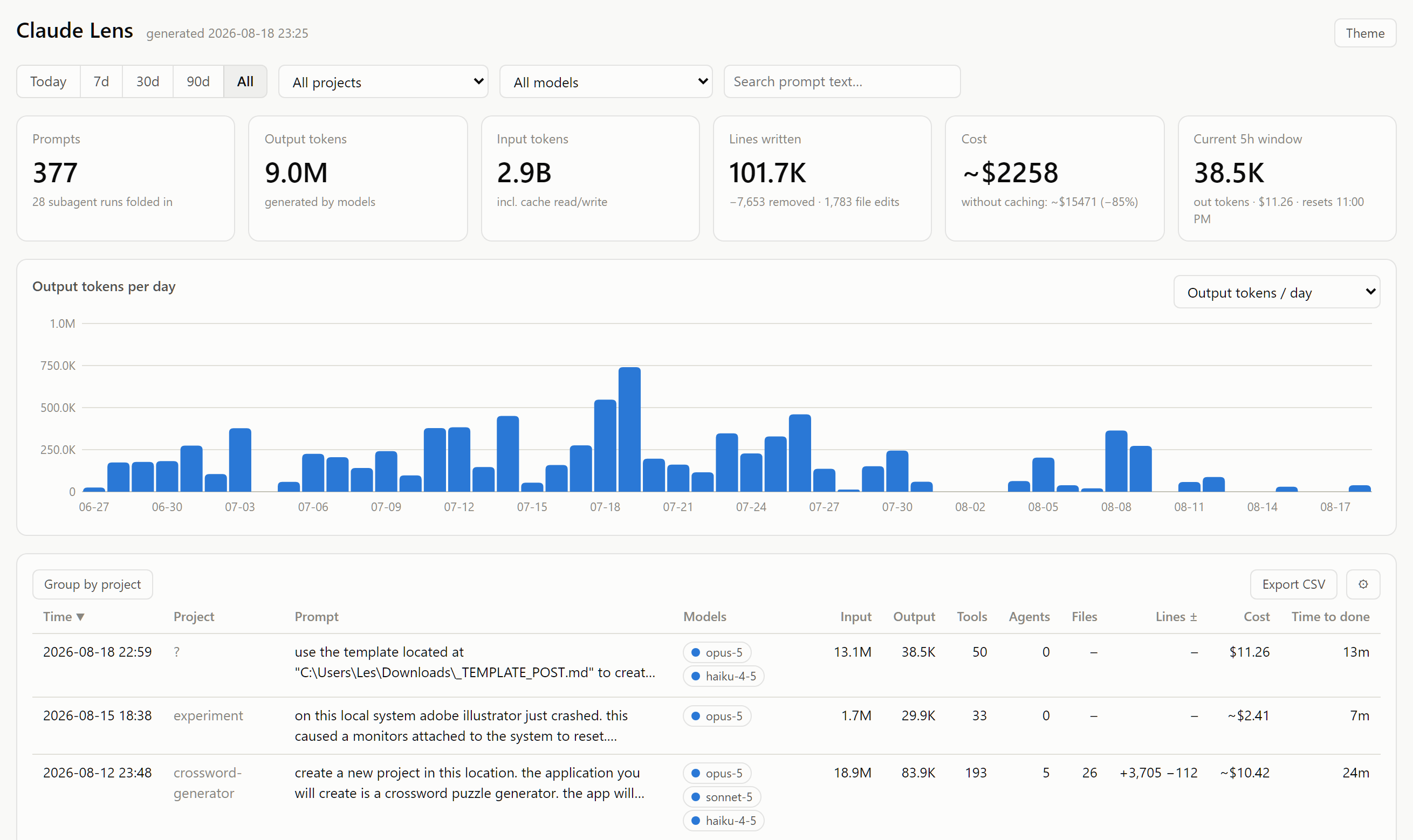
It runs entirely on your machine. It requires only Python 3.9 or later with no dependencies beyond the standard library. The dashboard itself is a single self-contained HTML file with no external scripts, fonts or network calls. Nothing is uploaded anywhere. This minimal deployment serves to decrease friction which might slow adoption.
Each row in the report list what you need for analysis: when, which project, the prompt text, which models ran, tokens in and out, how many tool calls, how many subagents, files touched, lines added and removed, cost, and how long it took from pressing enter to the work being done. Click the row and it opens.
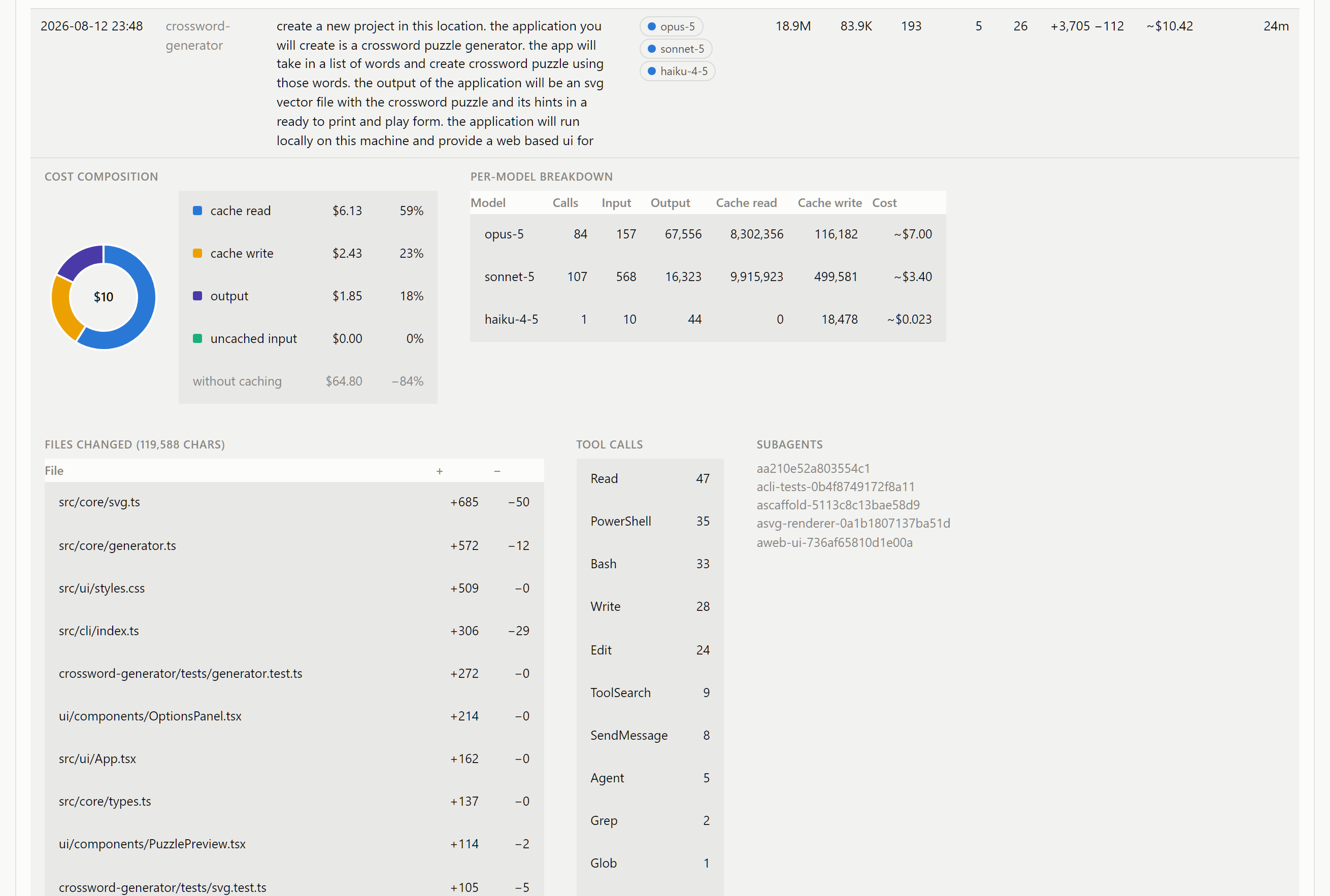
That expanded view provides a detailed breakdown. The donut splits the request's cost four ways — cache read, cache write, output, uncached input — and puts a counterfactual next to it: what the same request would have cost with no caching at all. For the request shown, $10.42 became $64.80 without it.
How it works
There are two sources of truth, and Claude Lens uses both.
The first is the transcripts. Claude Code writes a JSON Lines file per session under ~/.claude/projects, and those files contain everything: each human prompt with its own identifier, every assistant turn with its token usage and model, every tool result. Subagent runs get their own files, and a subagent's entries carry the parent prompt's identifier, so rolling a subagent's tokens up to the request that spawned it is a straightforward grouping rather than a heuristic.
Transcripts are durable and retrospective. Run the tool on a machine that has been running Claude Code and you get history immediately, with no prior setup. That is the whole of the default mode: run one script, get a dashboard. The duration Claude Code retains data on your machine is a value you can change. The default retention period for Claude Code is 30 days. This is controllable by changing the setting cleanupPeriodDays. When Claude Lens runs it will retrieve all of the history available and store it in a small SQLite database. As long as you run Claude Lens at least once during your retention period it will aggregate all of your data up to current.
The second source is optional and live. Claude Code can emit OpenTelemetry events, and Claude Lens ships a receiver that listens on 127.0.0.1:4318 and ingests them as they happen. Two things make this worth the extra setup. It is minute-fresh rather than session-fresh, and its cost figures are the ones the CLI computed itself rather than Claude Lens' values from its pricing table. It also captures a little usage the transcripts do not, such as the small auxiliary calls that generate session titles.
Telemetry is push-based, so a receiver that is not running loses data permanently. The transcripts on disk are the safety net: the receiver re-runs the transcript reconciler hourly, and because both sources write to the same SQLite database keyed on Anthropic's request identifiers, their overlap is harmless. Live rows win conflicts, since they carry the authoritative cost.
Claude Code sessions ──OTLP/HTTP──► receiver.py (127.0.0.1:4318, optional)
                                        │  live events → metrics.db
~/.claude/projects/**/*.jsonl ──────►   │  + hourly reconcile
                                        ▼
                                  build_dashboard.py ──► dashboard.html
Harness-injected turns — a notification that a background agent finished, for instance — arrive as their own prompts with their own identifiers, so a single thing you asked for can fragment across several. Claude Lens combines them back into the request that caused them. Without that, a long autonomous run appears in the table as a dozen unrelated cheap requests rather than one expensive one, which is exactly backwards from what you need to see.
Calls made to the Anthropic Claude API outside of Claude Code are still written to the local disk, however some information, such as the prompt text, might be missing.
What my 377 prompts look like
Everything below comes from my own usage between 27 June and 18 August 2026: 377 requests across 16 projects and 63 sessions, resolving to 8,038 API calls, 46 days on which I did any work at all, 101,700 lines written, 1,783 file edits and 8,340 tool calls.
The dollar figures are token counts priced at Anthropic's published list rates. On a subscription plan that is not a bill — it is a metric for consumption against your plan's limits. This billing difference is the reason my personal account seemed more capable than my corporate account. Read them as relative magnitudes, which is what they are useful for. Anthropic's own guidance puts typical enterprise usage at around $13 per developer per active day; my $49 reflects a couple of months of unusually heavy building on the most expensive model available, and is not a benchmark anybody should aim for.
My bill was mostly re-reading
The total across the period is about $2,258. Here is how it divides:
| Component | Share of spend | What it is |
|---|---|---|
| Cache read | 66.3% | Re-reading conversation the model has already seen |
| Cache write | 23.0% | Committing new context to the cache |
| Output | 10.5% | The model actually generating text and code |
| Uncached input | 0.2% | Genuinely new input, read at full price |
Ninety percent of what I spent went on input, and two thirds of it on input that had already been read at least once. The code generation is only a tenth of the bill.
The mechanism is not mysterious once you see the ratio. The API is stateless, so every turn re-sends the entire conversation, and every tool result triggers another turn carrying the whole thing again. Across the period my requests consumed 2.9 billion input tokens to produce 9 million output tokens — 323 in for every one out — and 2.86 billion of those input tokens were re-reads of context the model had already been given: 317 tokens re-read for every token written. Prompt caching bills those re-reads at a tenth of the normal input rate, which is why the cost is merely dominant rather than ruinous. Without caching the same work would have cost about $15,470 — caching saved 85%.
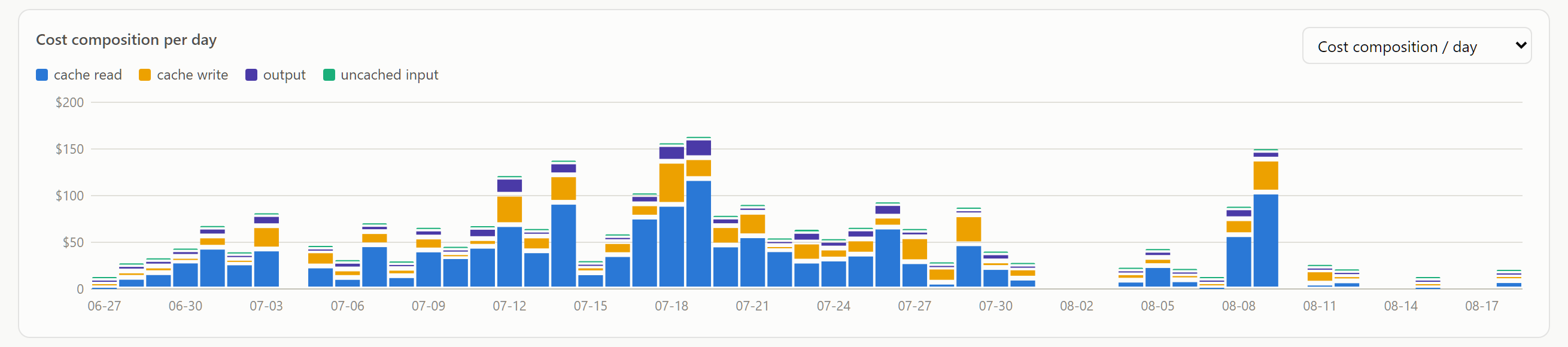
The stacked chart makes this easy to see. The blue band is cache read, and there is barely a day where it is not most of the bar.
Most content written about using these tools economically is framed around output: write tighter prompts, ask for less code. On this evidence, output is not the only place where money can be lost. My issue was is in how much conversation I was dragging behind me, and for how long. A one-line question asked in a session that has been open all day is not a one-line question. It is a one-line question plus everything else you said today, re-read.
Spend is concentrated
The second finding is about shape rather than composition.
| Slice of requests | Share of total spend |
|---|---|
| Most expensive 1% (3 requests) | 6.5% |
| Most expensive 5% (18 requests) | 26.7% |
| Most expensive 10% (37 requests) | 42.5% |
| Most expensive 25% (93 requests) | 71.8% |
| Cheapest 50% (187 requests) | 6.4% |
The median request cost $2.48 and the mean cost $6.02 — a 2.5x gap that tells you the distribution has a long tail before you look at anything else. The most expensive single request cost $53.
The practical consequence is that optimisation effort should be aimed, not spread. Cutting the cheapest half of my requests to zero would have saved six percent. Handling eighteen requests differently would have moved a quarter of the bill. And you cannot identify those eighteen from an aggregated monthly total; you need the individual rows Claude Lens provides.
The model mix
Costs by model, over the same period:
| Model | Requests | Share of spend |
|---|---|---|
| Claude Opus 4.8 | 6,221 | 76.4% |
| Claude Opus 5 | 887 | 12.1% |
| Claude Fable 5 | 449 | 10.5% |
| Claude Opus 4.6 | 192 | 0.8% |
| Claude Haiku 4.5 | 180 | 0.2% |
| Claude Sonnet 5 | 107 | 0.2% |
Ninety-nine point eight percent of my spend went to Opus-tier and above. I spent a lot of time during this period doing massive greenfield work on new projects. Some of that is defensible — the hardest work in the period genuinely wanted the most capable model — but a good deal of it is simply that Opus was the default and I never revisited it. That is exactly the pattern Anthropic's own cost documentation names as the usual cause of unexpected spend: long sessions that were never cleared, and Opus left as the default.
It is worth being careful about the obvious inference, though. Anthropic's guidance is explicit that assigning a cheaper model to genuinely complex reasoning (like planning new projects) frequently makes the finished task more expensive, because it burns tokens on retries and needs more human correction. The right question is not "what is cheapest" but "what is the least expensive model that finishes this without a second attempt", and the answer differs per task rather than per person.
Correcting the mistakes
What follows maps Anthropic's published guidance onto the columns that let you tell whether it is working for you. The advice is theirs; the instrumentation is the part I am adding.
Keep the conversation short
If two thirds of the bill is re-reading, then the length of what gets re-read is the dominant variable, and the single highest-leverage behavior is /clear between unrelated tasks. Stale context is not free background; it is re-transmitted on every subsequent message for the rest of the session.
Anthropic puts the consequence plainly: "One long session costs more than the same work spread over a few short ones, and by more than you'd think, because turn 40 is also re-reading the 39 turns before it." Use /rename before clearing if you want to find the session again, and /resume to come back to it.
When you need continuity rather than a clean break, /compact summarises the history instead of discarding it — and it takes an argument (/compact Focus on code samples and API usage) so you can say what to preserve. You can also set standing instructions in CLAUDE.md under a # Compact instructions heading. Compaction is not free — it reads the conversation it is summarising, so compacting a very large context is itself a large request — but it beats carrying the context indefinitely. /clear, by contrast, costs nothing at all.
Subagents are also a big help here. We often think of subagents as clean slates that can hold additional context since they are not filled with the main agent's context. This is true but they also serve to isolate the main agent's context from all of the work they do. Imaging what it would be like if every time you ordered food at a restaurant the staff delivered your food and gave a full retelling of every processes used in its creation. That is what will happen if your main agent is used to run all of your work. Subagents just deliver the food, and spare your agent from the unnecessary details. Claude Code will normally run subagents if simply asked. An instruction or prompt which says 'use sonnet and haiku subagents when appropriate' will go a long way.
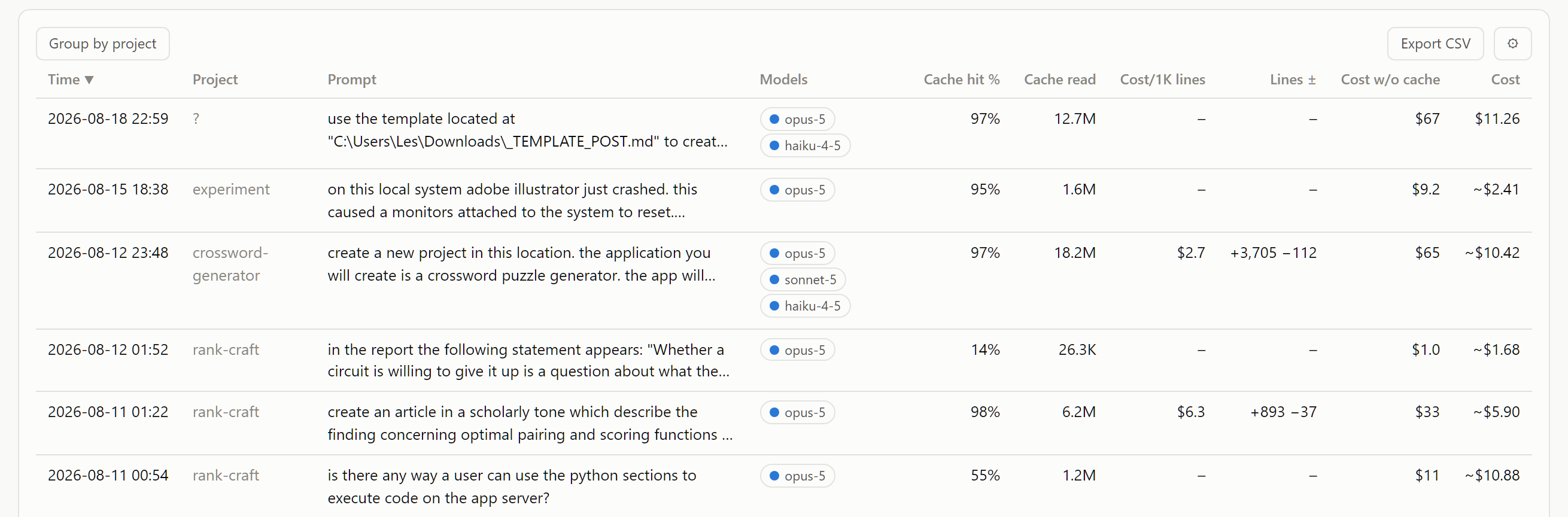
What to watch in the dashboard: the cache-read column. Add it via the ⚙ column picker, sort descending, and look at what is at the top. A short request with millions of cache-read tokens behind it is a request that is processing a conversation it did not need.
Do not lose the cache you have already paid for
Cache reads bill at roughly a tenth of the input rate; cache writes bill at 1.25× for the five-minute lifetime and 2× for the one-hour one. That asymmetry means a cache miss is not neutral — you pay a premium to re-establish what you previously had at a discount. In my data, cache writes are 23% of spend on their own.
Three things cause avoidable misses:
- Coming back after a break. The cache lifetime is an hour on a subscription, and five minutes on an API key, on a cloud provider, or once you are drawing on usage credits. Setting
ENABLE_PROMPT_CACHING_1H=1keeps the one-hour lifetime while on usage credits. Anthropic's own suggestion is to run/compactbefore you step away, on the grounds that summarising is much cheaper while the conversation is still cached. - Changing model or effort mid-conversation. Caches are scoped to the model, and switching busts them. Set both at the start of a session rather than adjusting halfway through.
- Resuming a very large session cold. On Pro and Max plans, Claude Code will offer to resume from a summary instead of the full history; take it.
What to watch: the cache-hit-% column. In the figure above you can see a request sitting at 14% next to several at 90–98%. That 14% is the signature of a cold start.
Match the model and the effort to the work
Sonnet handles most coding tasks and costs less than Opus; keep Opus for architectural work and multi-step reasoning. /model switches mid-session (accepting the cache cost), and /config sets the default. Subagents take a model: field in their configuration, and simple ones can run on Haiku.
Effort is the less-used parameter and often the better one. Extended thinking is on by default because it materially improves hard planning tasks, and thinking tokens bill as output tokens — the expensive kind. For work that does not need deep reasoning, /effort lowers it without changing model.
What to watch: the model badges on each row, and the per-model table in the expanded view. Filter to your most expensive requests and ask, honestly, how many of them needed the model they got.
Audit what is loaded before you start
Run /context once in a fresh session. It shows what is occupying the window before you have typed anything — CLAUDE.md, MCP tool definitions, skills — and that baseline is re-read on every single turn for the rest of the session.
- Keep
CLAUDE.mdunder about 200 lines. It loads at session start whatever you are doing. Detailed workflow instructions belong in skills, which load on demand only when invoked. - Prune MCP servers. Tool definitions are deferred by default, so only names enter context until a tool is used, but
/mcpwill show you what is configured and let you disable what you are not using. Where a CLI exists —gh,aws,gcloud— it is more context-efficient than the equivalent MCP server, because it adds no per-tool listing at all. - Code intelligence plugins for typed languages may help. A single "go to definition" replaces a grep plus several speculative file reads.
Push volume out of the conversation
Anything verbose that lands in the conversation stays there and is re-read on every subsequent turn. Three ways to keep it out:
- Subagents. As mentioned before give a subagent the test run, the documentation fetch, the log trawl. The verbose output lives in its context window; only a summary comes back to yours. My own subagent share is a mere 0.7% of spend, which on reflection is a parameter I have badly under-used.
- Hooks. A
PreToolUsehook can rewrite a command before it runs — piping test output through a filter that keeps only failures, for example — turning tens of thousands of tokens into hundreds. This is the highest-leverage trick in the whole list for anyone whose test suite is chatty. This needs to be used with care. After a few months working in other areas of your code you may forget your hooks filtered verbose output. When the stress is high chasing a production issue you may not realize Claude is missing information from a log because your token saving hook has removed it. - Quiet flags. The plainest version of the same idea. Command output minimized so there is little to contaminate your context. If your CLI tool is being run to generate a file then then Claude Code does not need hundreds of lines of info statements added to its context.
You can also @-mention files rather than describing them. The file attaches directly to your message, which saves a Read call, or a search if Claude has to go and find it first. Check the documentation of your harness to see if it automatically include certain files. For example visual studio code will automatically include the file that is currently open in your editor so Claude does not need to search for it.
Avoid paying twice for a wrong direction
The most expensive request in a session is often the second attempt at something. Four habits, all from Anthropic's guidance and all consistent with what my expensive rows look like:
- Write specific prompts. "Add E2E tests" triggers broad scanning; "add input validation to the login function in
auth.ts" does not. - Use plan mode for anything substantial (Shift+Tab). Claude explores and proposes an approach before implementing, which is dramatically cheaper than discovering the approach was wrong after the fact.
- Course-correct immediately. Escape stops it;
/rewindor a double Escape restores conversation and code to a checkpoint. - Give it a way to check itself — test cases, expected output, a screenshot. Verification it can do itself is verification you do not pay a second round trip for.
Watch the things that multiply
Some features scale token use by a factor rather than a margin, and are worth knowing about before you leave them running:
- Agent teams spawn multiple Claude Code instances, each with its own context window. Anthropic quotes roughly 7× the tokens of a standard session when teammates are in plan mode. Keep teams small, keep spawn prompts tight, use Sonnet for teammates, and shut them down when their work is finished — an idle teammate is still consuming.
- Scheduled tasks and cross-session messages fire on their own schedule and send your full context each time, even while you are away from the keyboard.
- Long-open idle sessions in general. A session that has been open all day is carrying all day.
Watch for rows you don't remember: If you see a row in Claude Lens with a prompt you don't remember writing then something is working without your knowledge and should be investigated.
Check on the agent
In some cases the agent can go off on a tangent it cannot recover from. I had an incident where Claude Code was testing a new feature for a very long time. On examination I discovered that an older version of the app was still running on the port where Claude expected its app under test to be running. Claude would make changes to the app and rerun it but the old server was still there so tests did not pass. Claude had in its instructions a directive to work until a task was complete and to consider a task complete only if its tests pass. This put Claude into an endless loop of profoundly opulent token feasting.
Checking on your agents that have run for an extended period can prevent these issues. If you see something in the agent conversation which you know to be impossible you can press escape and provide correction. If this happens frequently then check your instructions to see if a combination of directives is pushing Claude into a loop.
Getting it
Claude Lens is on GitHub at github.com/hypertetrahedron/claude-lens under an MIT licence. It works on Windows, Linux and macOS.
The one-file version
Clone the repository and run one script:
Windows:      .\generate-dashboard.ps1
Linux/macOS:  ./generate-dashboard.sh
That parses every transcript under ~/.claude/projects (honouring CLAUDE_CONFIG_DIR if you have set it), builds the database, writes dashboard.html next to the script and opens it. Re-running is incremental — only new or changed transcripts are re-parsed. -Force / --force re-parses everything; -NoOpen / --no-open skips the browser.
That is the entire setup. Everything below is optional.
Live mode
For minute-fresh data and the CLI's own cost figures, add a telemetry block to ~/.claude/settings.json:
"env": {
  "CLAUDE_CODE_ENABLE_TELEMETRY": "1",
  "OTEL_LOGS_EXPORTER": "otlp",
  "OTEL_METRICS_EXPORTER": "none",
  "OTEL_EXPORTER_OTLP_PROTOCOL": "http/json",
  "OTEL_EXPORTER_OTLP_ENDPOINT": "http://127.0.0.1:4318",
  "OTEL_LOG_USER_PROMPTS": "1"
}
Then run python receiver.py and keep it running — a Task Scheduler at-logon task on Windows, a systemd user unit on Linux. The receiver listens on localhost only; prompt text never leaves the machine. Sessions that started before you enabled telemetry are still picked up from their transcripts.
Weekly digest
python digest.py writes a self-contained report for the last seven full days to reports/: totals, per-project and per-model breakdowns, the ten most expensive requests, and a daily breakdown. Existing digests are never overwritten, and an index page links them all. Schedule it weekly if you want the habit without the ceremony.
Limmitations
File-change counts come from the structured diffs that Edit and Write leave in transcripts. Changes made through Bash — a git operation, a generator script, a sed invocation — leave no diff and are not counted. If your workflow leans on shell-mediated edits, the lines-written column understates you, and any metric derived from it (cost per thousand lines, lines per minute) understates you in the same direction.
Cost for historical rows is estimated rather than reported, and the estimate is only as current as the pricing table. When a new model launches, the tool warns rather than silently reporting zero — but the table still needs updating.
And it only sees Claude Code. Usage from claude.ai, from other machines, or from other tools entirely is not in the picture.
Sources: Manage costs effectively and Prompt caching in the Claude Code documentation; Maximizing the value of your Claude Code sessions; Optimizing for cost and intelligence on the Claude platform. All usage figures and screenshots are my own, measured with Claude Lens.